Paper Toss
One bin, one fan, endless excuses not to work.
About Paper Toss
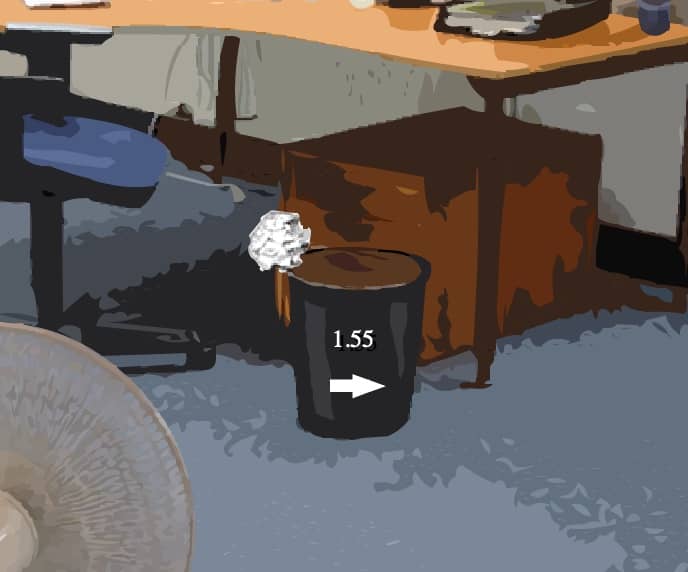
Paper Toss is the office desk game that everyone has played for real: crumple a piece of paper, aim at the bin, throw. The original by Backflip Studios was one of the early mobile hits, and its browser version made the same idea available to anyone stuck at a desk.
Each throw has a twist: a desk fan blows across the room, and its speed and direction change between throws. You have to read the wind and compensate – aim into it, add a little power – to land the ball in the bin. Consecutive baskets build your score, so one bad throw costs more than a single point.
It is the purest kind of Flash-era game: seconds to learn, a single mechanic, and a "just one more throw" pull that is hard to resist.
How to play
- Click and drag on the paper ball, then release to throw.
- Check the fan before each throw.
- Land as many baskets in a row as you can.
The game is played with the mouse only.
More quick games
For more one-more-go games, try Yeti Sports: Pingu Throw, Football Kicks or the rest of the launch & upgrade box.
Stuck? Hints, gentlest first
Hint 1 – read the fan
The fan's direction and strength are shown on screen. Aim against the wind – the stronger it blows, the further you aim to the other side.
Hint 2 – same throw, small changes
Find a throw that lands close, then change only one thing at a time: a little more angle or a little more aim.
Hint 3 – keep the streak
Score keeps building as long as you keep landing shots. Slow down after a miss instead of rushing the next throw.
FAQ
How do you throw in Paper Toss?
Click and drag (or swipe) on the paper ball and release to throw it. The angle and length of the movement set the direction and power.
Can I still play Paper Toss in 2026?
Yes. Adobe stopped supporting Flash in 2020, but Paper Toss runs on this page through a Flash emulator built into the player. Press Play and it starts in a few seconds.
Do I need Flash Player to play Paper Toss?
No. You don’t need to install Adobe Flash Player, a plugin or any download. Paper Toss runs in any modern browser such as Chrome, Firefox, Edge or Safari.
Can I play Paper Toss on my phone?
Usually, yes. Paper Toss is played with the mouse, so taps work in most mobile browsers – although a computer still gives the best experience.
Who made Paper Toss?
Paper Toss was made by Backflip Studios and released in 2009. The game belongs to its creator; FlashAttic only embeds it so it can still be played.
Does Paper Toss save my progress?
FlashAttic remembers that you played Paper Toss and for how long on this device. Whether the game saves your level depends on the game itself – many Flash games use level codes or their own save slot.